
When ideal switches are not enough
Import component models described as SPICE netlists into your PLECS circuit. With PLECS Spice, an add-on for PLECS Standalone, you can combine
- Components modeled in SPICE with
- Controls modeled in PLECS
in the same simulation model and solve them together.
No need to do the work twice
Maintaining separate toolchains for system-level and circuit-level simulation would lead to:
- Duplicate models
- Duplicate workflows
- No practical way to assess the impact of parasitics at the system level
Keep all levels of detail in one model
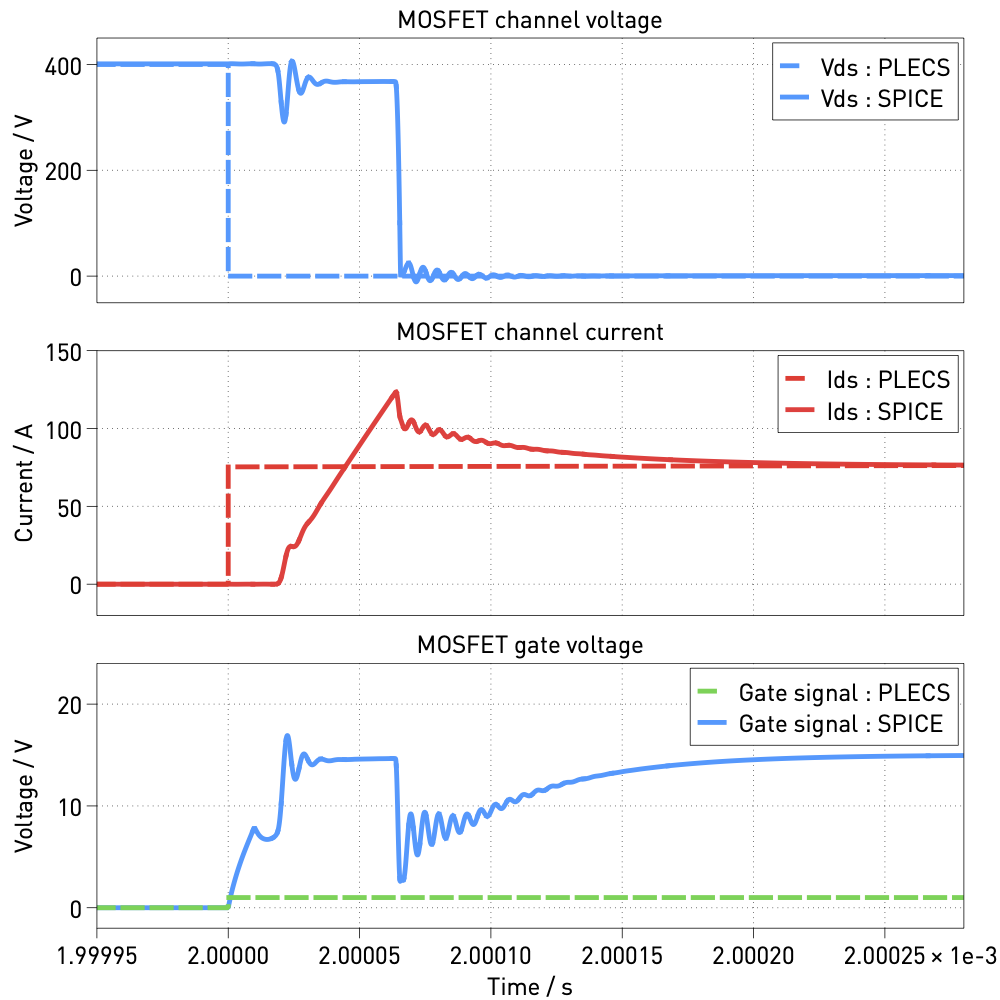
If you provide both ideal switch models and detailed device models for all semiconductors, you can seamlessly toggle between PLECS and SPICE simulations. This single schematic approach lets you
- Maintain a top-down workflow
- Use the same schematic for PLECS and SPICE simulation
- Overlay simulation results from ideal and detailed component models
How it works
Learn how you can simulate a dual active bridge (DAB) with zero voltage switching (ZVS):
 Bridging the Gap Between PLECS and SPICE
Get started with PLECS Spice
Follow these simple steps to request a trial license:
- Launch PLECS Standalone and select 'Help' → 'PLECS License Manager' → 'Request license'
- Select 'Trial license' and 'PLECS Standalone' and open the web form
- Mention 'PLECS Spice' in the comment field of the web form
Background
PLECS Spice results from a project (PowerizeD, HORIZON-KDT-JU-2021-1-IA) which has been accepted for funding within the Key Digital Technologies Joint Undertaking (KDT JU), a public-private partnership in collaboration with the HORIZON Framework Programm and the national Authorities of Germany, Belgium, Spain, Sweden, Netherlands, Austria, Italy, Greece, Latvia, Finland, Hungary, Romania and Switzerland, under grant agreement number 101096387. Co-funded by European Union.
 |
 |
 |
This work has received funding from the Swiss State Secretariat for Education, Research and Innovation (SERI) and is co-funded by the Innosuisse – Swiss Innovation Agency.

|  |